
Crossword Go! review
 Analysis by GetAllApps
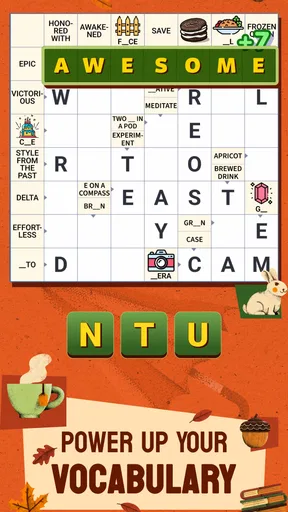
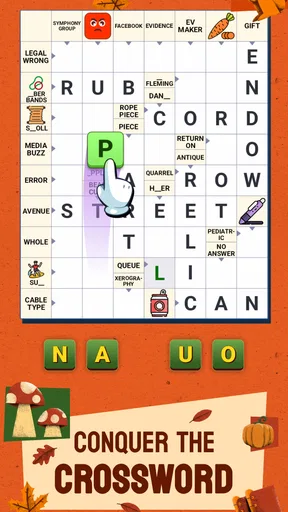
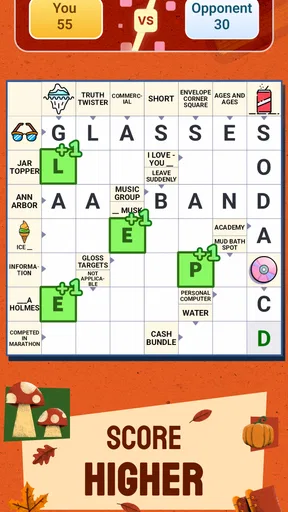
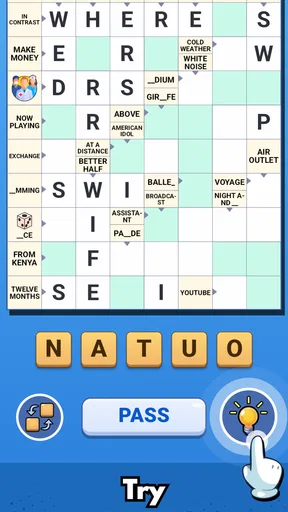
Crossword Go! is a word game I’d reach for when I want a quick puzzle, not a long session that demands a quiet room and a dictionary. Its crossword format makes it familiar from the first glance, while the clues give each puzzle a little more texture than simply filling boxes from memory. I find that combination especially appealing for short breaks: I can try a few answers, pause when I’m unsure, and return when I have a fresher angle.
Getting started without turning a quick game into a chore
The first hurdle with a crossword is rarely complicated controls; it is getting comfortable with the clue style. If you are used to newspaper puzzles, you may expect clues that lean heavily on wordplay or specialist knowledge. If you are newer to crosswords, even an ordinary clue can feel opaque until a few crossing answers give you letters to work with. I recommend starting with the answers you know rather than guessing at every blank. Crossings are useful evidence, not just spaces to fill.
That approach suits Crossword Go! particularly well because its appeal is in approachable, clever clues rather than in making every puzzle feel like an exam. When a clue stalls me, I move to another part of the grid and come back with more letters. That small change in order often helps more than staring at one blank. It also makes the game easier to share: one person can suggest a clue, while another checks how the proposed word fits across the grid.
Crossword Go! is a free word game from PlaySimple Games, and the app is rated for Everyone. It had its release on April 16, 2025, and the current version is 1.84.0. Those details matter less to the puzzle-solving itself than to deciding whether it suits your device and expectations, but they place the game firmly in the casual mobile crossword space rather than the traditional newspaper-only routine.
On the store, it has a 4.9 average from around 75,000 ratings, alongside roughly 3,500 written reviews and over one million installs. That is a strong reception, though popularity alone cannot tell you whether its clue tone will match your taste. I’d treat the numbers as a reason to consider it, not as a promise that every puzzle will click for every player.
Small setup checks that prevent avoidable frustration
If the game does not open or behaves unexpectedly, I would begin with the ordinary checks rather than assuming the puzzle itself is broken. Confirm that the device meets the minimum OS requirement of version 8.0, then close and reopen the app. If an update is available through the app store, installing it is a sensible next step; this title’s current version is 1.84.0. These are basic checks, but they can separate a temporary device hiccup from a problem with a particular puzzle.
It is also worth checking that you have enough room to use the screen comfortably. Crossword grids ask you to look between clues and letter spaces, and cramped viewing can make a simple entry feel harder than it is. If you are playing with someone else, agree on whether you are solving together or taking turns before you begin. That sounds obvious, but it avoids one person entering an answer while the other is still reasoning through a different possibility.
The game is free to download, with optional in-app purchases priced from $0.99 to $49.99 per item. I would keep that in mind if you are choosing it for a child or if you prefer games with no purchase prompts or optional spending at all. The Everyone rating makes the age suitability broad, but it does not mean the purchase model is irrelevant to a family’s preferences. If you want a strictly paper-like experience with no in-app buying, a printed puzzle may be a better fit.
How I recover when a clue stops making sense
My most useful crossword habit is to distinguish between a clue I do not know and an answer I have not tested. If I have a plausible word, I check each crossing before committing to it. One incorrect letter can make several nearby clues seem impossible, so revisiting a doubtful entry can be more productive than inventing increasingly obscure answers. This is a practical way to keep the puzzle moving without treating every blank as a separate problem.
For a shared session, I would also say the clue aloud before proposing an answer. A second person may interpret the wording differently, and that shift can reveal a familiar meaning you overlooked. The game’s premise is well suited to that kind of casual collaboration: one player can scan the grid while another contributes vocabulary or spots a pattern. It works best when suggestions stay tentative until the crossings support them.
If you lose your place or have to stop midway, avoid trying to reconstruct the whole puzzle from memory. Start again with the entries you are sure about and use their letters to orient yourself. I find that returning to a crossword after a short break can actually help, because a clue that felt stubborn may look straightforward once I stop forcing one interpretation. This is a general solving tactic, not a special feature, but it is a good fit for a game designed for bite-sized play.
When an entry seems not to register, first check whether the intended answer really matches the clue and the crossing letters. Then make sure you have selected the right part of the grid before entering anything. If the app itself appears unresponsive, closing and reopening it is a reasonable first recovery step. I would avoid repeatedly tapping at random: that makes it harder to tell whether the issue is a mistaken answer, a missed selection, or a temporary app problem.
When the app is not the real source of the snag
Not every difficult moment is a technical fault. Crossword clues rely on language, and a word that feels obvious to one player may be unfamiliar to another because of different interests, vocabulary, or experience with puzzles. When I cannot see a route forward, I ask whether I am missing a crossing letter or whether the clue depends on a meaning I rarely use. That distinction helps me decide whether to keep working or take a short break.
Screen conditions can matter too. Glare, a small display, or trying to solve while distracted can make the clue-and-grid back-and-forth tiring. If you are playing during a commute or in a noisy waiting area, keep the session modest and tackle the clues you can comfortably read. A quiet moment may be better for a puzzle that requires more concentration; the game is casual, but crosswords still reward attention.
There is also a difference between wanting a crossword and wanting a general word game. If you prefer building words from a rack of letters, searching a word grid, or racing another player, this may not satisfy that itch. Crossword Go! is for clue-led solving, where the wording matters and intersecting answers help narrow the possibilities. I would choose a different word-game format if I wanted speed, competition, or a more open-ended vocabulary challenge.
Who will enjoy this crossword style
I think the game is a good match for people who already enjoy crosswords but want a convenient mobile option, as well as newcomers who would rather learn through accessible puzzles than begin with a dense newspaper grid. It can fit a coffee break, a waiting-room pause, or a relaxed shared session at home. The key is to treat it as a small mental activity, not as something that needs to occupy an entire evening.
Compared with a printed crossword, the phone version is easier to carry and pick up in spare moments, but paper gives you more freedom to scribble notes and scan the whole puzzle at once. Compared with a basic word-search game, this title asks more of your interpretation because you must connect clues to answers rather than simply locate visible words. If that clue-solving step is what you enjoy, the format has more satisfying moments; if it feels like work, a simpler word puzzle will probably be more relaxing.
One useful way to play with a friend is to alternate who chooses the next clue to solve, rather than letting the quickest solver dominate the grid. That keeps the conversation moving and gives each person a chance to contribute. Another is to use crossings as a gentle check instead of immediately debating whether an answer is right. These habits make the shared experience more enjoyable without needing any special game mode or extra rules.
Crossword Go! is not the right choice if you want a guaranteed offline paper substitute, a highly competitive multiplayer experience, or puzzles that never require unfamiliar vocabulary. I also would not choose it for someone who dislikes clue interpretation altogether. Its central pleasure is precisely the small act of turning a written hint into a word and seeing that word connect with the rest of the grid.
My practical verdict
For a free mobile crossword, Crossword Go! has a clear, appealing purpose: it gives me a convenient way to work through clue-based puzzles alone or with someone nearby. I like the balance between familiar crossword logic and a casual pace, especially when I have only a few minutes to spare. Its strong 4.9 average and broad audience are encouraging, but the more important question is whether you enjoy solving from clues rather than simply arranging letters.
I would install it if I wanted a low-commitment word game to return to between other activities, and I would approach each puzzle by filling confident answers first, using crossings to test guesses, and stepping away when a clue becomes a loop. I would skip it in favor of paper or another word-game style if I wanted unrestricted note-taking, fast competition, or a completely purchase-free environment. For anyone who likes the satisfying click of a clue finally making sense, this is an easy game to recommend as a casual part of a daily routine.
Pros and cons
Pros
- Quick rounds make it easy to play during short breaks.
- Adjustable difficulty suits both casual and experienced solvers.
- Hints help you move forward when a clue proves difficult.
- Daily puzzles give you a reason to return regularly.
- The clean interface keeps clues and the grid easy to read.
Cons
- Some puzzles may feel too easy for experienced crossword fans.
- Hints can reduce the challenge if used too often.
- Ads may interrupt play depending on the version.
- A small screen can make the grid harder to navigate.
- Progress may be lost if it is not backed up or synced.


